

Mp3 and Mp4 supported.

MP3Juice

MP3Juice Music Search and MP3 Downloads

MP3Juice helps you move from a song in mind to the recording you actually want. Search by title, artist, or a few useful keywords, compare the matching videos, and open an available audio download. If you already know the upload, paste its YouTube link above to go straight to conversion.

How to Use

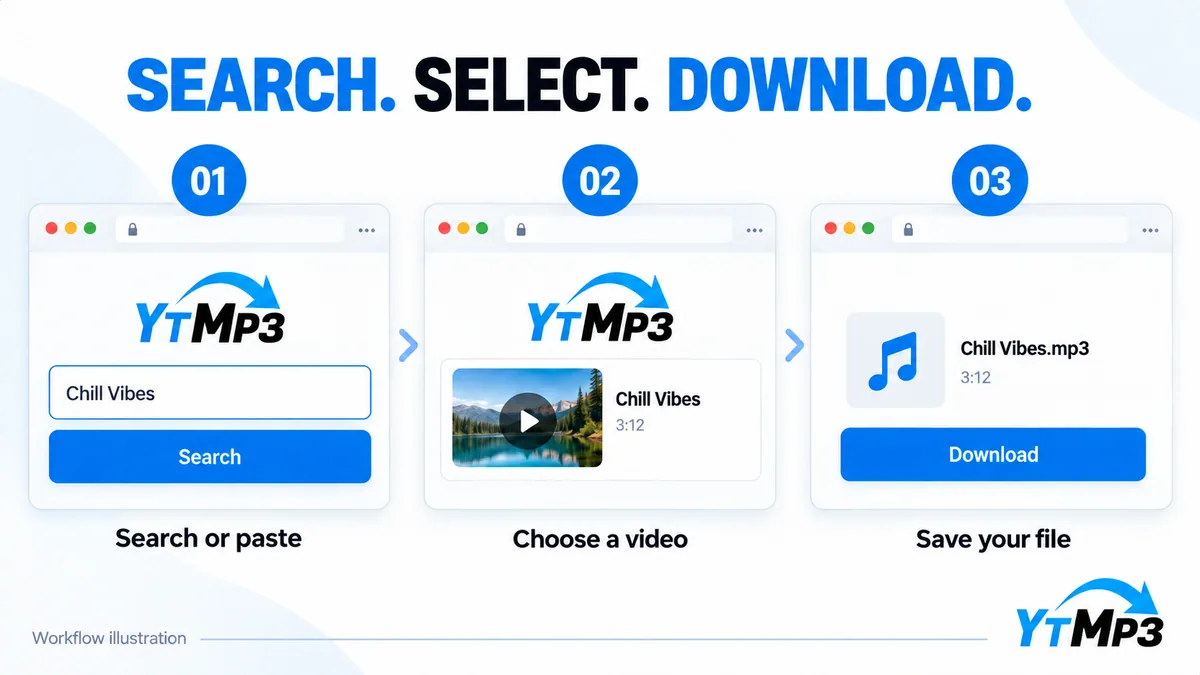
Ytmp3 search, select and download illustrated in light mode
  1. Enter a focused search

    Use a song title and artist, or paste the exact supported YouTube video URL.

  2. Compare the matches

    Check the performer and version. A familiar song title can belong to several different recordings.

  3. Open the audio option

    Select the matching result and review its available MP3 download. Save only material you are allowed to keep.

Start with the artistA title plus an artist is usually more useful than a long sentence.
Match the versionLook for live, studio, instrumental, or remix details before choosing.

Find the song, not just a similar title

Music search works best with a little context. An artist name can separate unrelated songs with identical titles, while words such as acoustic or live can help identify a particular performance. Start with the details you know, then simplify the query if the results are too narrow. The Trending list offers another starting point when you want to explore current chart tracks.

Before opening a download, compare the result with your intended source. A cover, shortened edit, interview, or compilation may include the same words without being the version you want. A direct video link avoids that ambiguity when you have already found the correct upload.

Keep a useful MP3 library

Once a permitted file has finished downloading, play a short section and check its duration. Give it a clear filename using the artist and song title, then keep related recordings together. MP3 is convenient for audio playback, but the quality remains limited by the recording and the available conversion option. A larger file cannot repair a poor source.

This music-search page uses the Ytmp3 search and conversion workflow; it does not claim affiliation with a separate MP3Juice operator. Only download recordings you own or have permission to save. For more options, return to Ytmp3 or explore the dedicated YouTube to MP3 page.

Frequently Asked Questions

Can I search without a video link?

Yes. A title, artist, or combination of keywords can produce matching video results.

Why are there several versions of one song?

Search can include covers, live performances, remixes, and different uploads. Check the title and source before converting.

Does a higher bitrate fix a low-quality recording?

No. Encoding cannot recreate audio detail that is missing from the source.